5 Tips for Emailing Your Cover Letter
Emailing a cover letter is a crucial step in the modern job application process. It’s often the first impression you make on a potential employer, so it’s vital to get it right. Unlike sending a physical cover letter, emailing requires attention to specific details, from the subject line to the file format. This guide provides essential tips to help you successfully email your cover letter, ensuring it’s professional, well-formatted, and grabs the hiring manager’s attention. Mastering this skill significantly increases your chances of landing an interview and ultimately securing your dream job. We will cover everything from crafting the perfect subject line to attaching your documents correctly and following up effectively. By following these guidelines, you’ll present yourself as a polished and professional candidate ready to make a positive impact.
Crafting a Compelling Subject Line
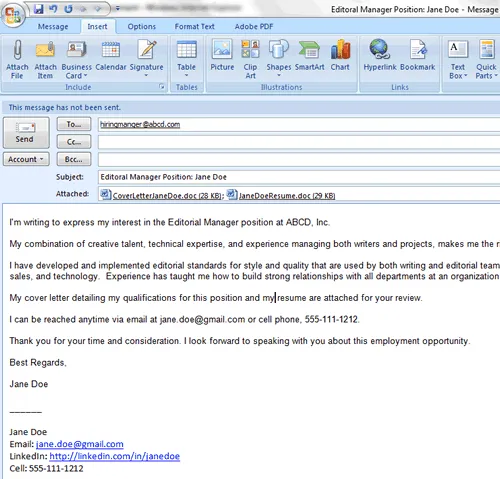
The subject line is the first thing a hiring manager sees, and it sets the tone for your entire email. A clear, concise, and attention-grabbing subject line increases the likelihood of your email being opened. Avoid generic phrases like ‘Cover Letter’ or ‘Job Application’. Instead, include the job title and your name. For instance, use ‘Application for Marketing Manager Position - [Your Name]’. If the job posting specifies a particular subject line, always adhere to those instructions. Furthermore, keep it brief, ideally under 50 characters, to ensure it displays fully on various devices. A well-crafted subject line immediately communicates the purpose of your email, making it easy for the recipient to understand and prioritize. A strong subject line will make you stand out from the dozens, or even hundreds, of applicants and get your foot in the door.
Personalizing Your Email

Personalizing your email goes beyond just addressing the recipient by name; it involves tailoring your message to the specific job and company. Start with a professional salutation, like ‘Dear Mr./Ms./Mx. [Last Name],’ if you know the hiring manager’s name. If not, use a general greeting, such as ‘Dear Hiring Manager.’ In the body of your email, briefly state the position you are applying for and how you found the job posting. Show genuine interest in the company by mentioning something you admire about their work or culture. Briefly highlight your relevant skills and experiences, referencing the job description to demonstrate how your qualifications align with their needs. Avoid sending a generic email; make each one unique by reflecting on what you can offer the specific company and position, creating a connection that shows you’ve done your research and are genuinely interested in the opportunity. This level of personalization will capture their attention and make your application memorable.
Formatting Your Cover Letter for Email
The format of your cover letter within the email body is crucial. Keep it concise and easy to read. Use a professional font like Arial, Calibri, or Times New Roman, with a font size between 10 and 12 points. Limit the length of your email to a few short paragraphs, using clear, concise language. While it’s common to include a brief introductory paragraph, the primary purpose of the email body is to introduce yourself, state the position you’re applying for, and guide the reader to your attached cover letter and resume. Avoid complex formatting within the email itself, as it may not display correctly across different email clients. The main body of your cover letter should be in a separate document, such as a PDF or Word document, which you will attach to your email. Focus on making the attached cover letter and resume look professional and appealing.
Attaching the Cover Letter and Resume
Attaching your cover letter and resume correctly is fundamental to a successful job application. Always attach both documents to your email, and double-check that they are included before sending. Name your files professionally, using your name and the document type, such as ‘JaneDoe_CoverLetter.pdf’ and ‘JaneDoe_Resume.pdf’. This helps the recipient easily identify each document. The preferred file format for your cover letter and resume is PDF (Portable Document Format). PDFs preserve the formatting of your documents regardless of the recipient’s operating system or software. This ensures that your cover letter and resume look exactly as you intended. If the job posting explicitly requests a different format, follow those instructions. Ensure all attachments are virus-free by scanning them before sending, protecting both yourself and the recipient.
Sending the Email and Following Up

After composing your email and attaching your documents, it’s time to send it. Review everything one last time – subject line, email body, attachments, and recipient’s email address – to avoid any errors. Proofread for any grammatical errors or typos, and then send your email. After sending your email, a follow-up is often a good practice. Wait about a week before sending a polite follow-up email. This shows your continued interest in the position. In your follow-up, briefly restate your interest, refer to your previous email, and ask if the hiring manager has had a chance to review your application. Keep the follow-up concise and professional. If you don’t hear back after a second follow-up, it may be time to consider that the company has moved on with the hiring process. However, following up demonstrates your enthusiasm and attention to detail, which can make a positive impression.
Key Considerations Before Sending
Proofreading and Editing
Proofreading and editing are critical steps before sending your email. Errors can create a negative impression, suggesting a lack of attention to detail or professionalism. Carefully read through your entire email, including the subject line, body, and the attached cover letter and resume. Check for grammatical errors, spelling mistakes, and punctuation issues. It can be helpful to read your email aloud, as this often helps you catch errors you might miss when reading silently. Use a grammar and spell-checking tool, but don’t rely on it completely; these tools can sometimes miss subtle errors. Consider having a friend or family member review your email, as a fresh pair of eyes can easily spot mistakes you’ve overlooked. Correct all errors, and then proofread again. A polished, error-free email demonstrates your professionalism and increases your chances of making a positive impression.
Choosing the Right File Format

Choosing the right file format for your cover letter and resume is crucial for ensuring your documents are displayed correctly by the recipient. The best and most widely accepted format is PDF (Portable Document Format). PDFs preserve the formatting of your documents, ensuring they appear as intended, regardless of the recipient’s operating system or software. This means the layout, fonts, and images in your cover letter and resume will remain consistent. Word documents (.doc or .docx) are also acceptable, but they can sometimes have formatting issues when opened on different versions of Microsoft Word or other word processors. Always save your documents as PDFs unless the job posting specifies a different format. If you must use a Word document, double-check the formatting on a different computer before sending. Consistency in formatting and clear presentation will significantly enhance your application.
Understanding the Recipient’s Preferences
Before sending your email, it’s wise to check for any specific instructions or preferences from the recipient. The job posting or the company’s website may provide details on how to submit your application, including the preferred file format, subject line format, or whether to include a cover letter in the body of the email. Always follow these instructions meticulously. If no specific instructions are given, follow standard practices. If you know the hiring manager’s name, address the email directly to them. If not, a general greeting, such as ‘Dear Hiring Manager,’ is appropriate. When in doubt, err on the side of professionalism and clarity. Showing that you pay attention to detail and can follow instructions will make you stand out as a candidate. Always tailor your application to the specific requirements outlined in the job posting to increase your chances of success.
Examples of Effective Cover Letter Emails
Example 1 Applying for a Specific Position

Subject Application for Marketing Specialist Position - [Your Name]. Dear Mr. Smith, I am writing to express my interest in the Marketing Specialist position at [Company Name], as advertised on [Platform]. With my [Number] years of experience in marketing and a proven track record of [Specific Achievement], I am confident I can contribute to your team’s success. Please find my cover letter and resume attached for your review. Thank you for your time and consideration. I look forward to hearing from you soon. Sincerely, [Your Name] This example is concise, professional, and immediately conveys the applicant’s interest and qualifications. It mentions the specific position and highlights the key skills relevant to the role. The applicant is not only mentioning the position and their enthusiasm, but showing it.
Example 2 Networking and Connecting with Recruiters
Subject Networking and Application - [Your Name]. Dear [Recruiter’s Name], I hope this email finds you well. My name is [Your Name], and I am a [Your Profession] with [Number] years of experience. I am reaching out to connect with you and learn more about potential opportunities at [Company Name]. I recently came across [Mention Something Interesting] and am very impressed. Please find my resume attached. Thank you for your time and consideration. I look forward to hearing from you soon. Best regards, [Your Name]. This is for networking with a recruiter. This example demonstrates initiative and provides a personalized approach. It establishes a connection beyond a job application, showcasing the candidate’s interest in the company, not just the job.
Example 3 Following Up After an Interview
Subject Following Up - [Job Title] Interview. Dear [Hiring Manager’s Name], Thank you for taking the time to interview me for the [Job Title] position on [Date]. I enjoyed learning more about the role and the team. I am very enthusiastic about the opportunity and confident I can meet your company’s needs. As discussed, I have attached a follow-up document. Please let me know if you need any further information. I look forward to hearing from you. Sincerely, [Your Name]. This example expresses gratitude and reiterates interest. It reinforces the candidate’s enthusiasm. If any additional documents were requested, they are mentioned. The candidate confirms they are looking forward to hearing back.